Assessments built on proof.
Standard browser tests cannot see hidden AI assistants, extra monitors, or screen sharing. Clevid runs in a dedicated desktop workspace with continuous video proof and human review—so hiring teams evaluate real skill with complete confidence.
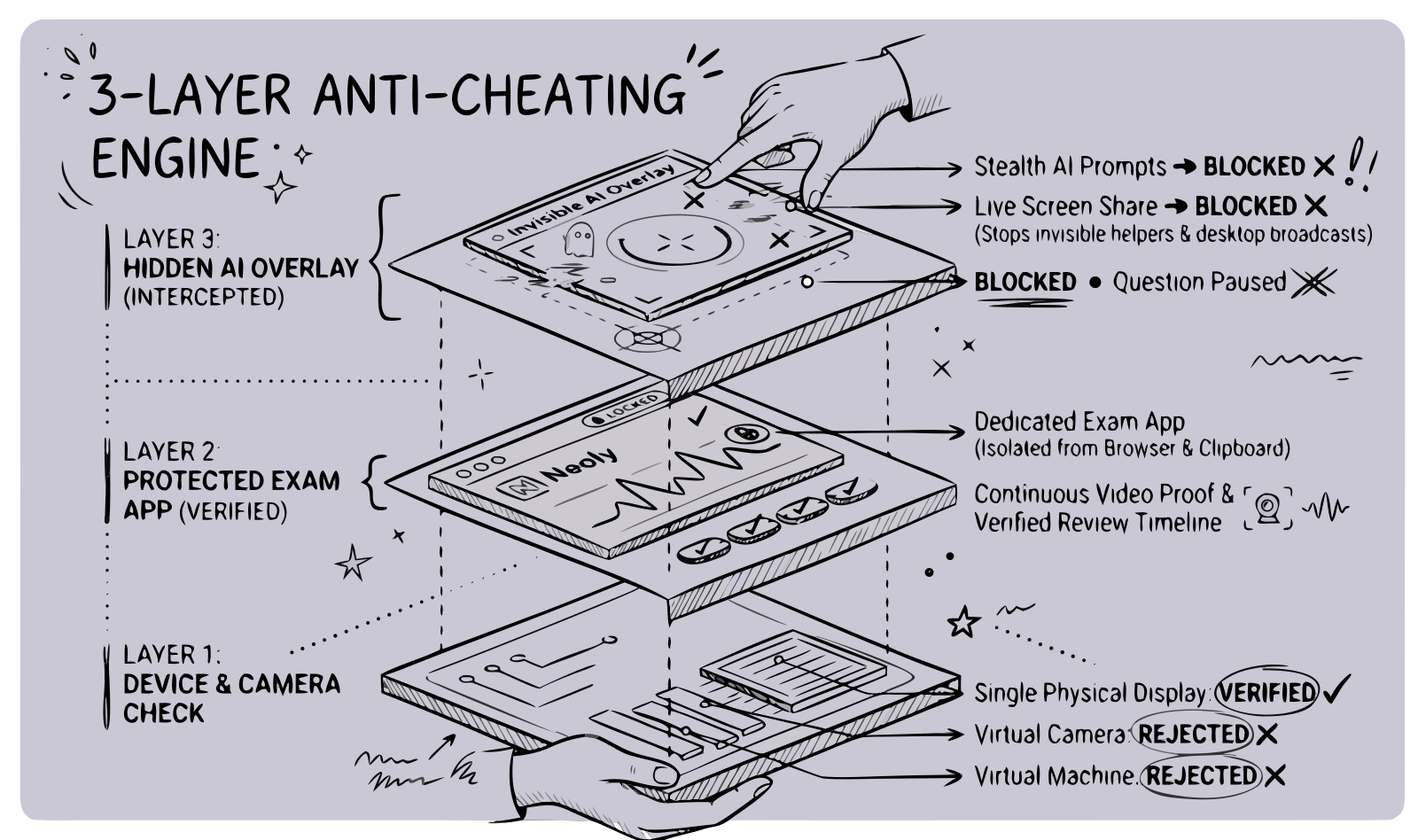
Browser tabs cannot see floating AI assistants or live screen shares running outside the tab.
Detects any hidden helper window above the test and automatically pauses the question until closed.
Desktop Lockdown
Runs inside a dedicated single-window desktop app rather than a browser tab, blocking screen sharing, extra displays, virtual machines, and invisible AI overlays before the clock starts.
Evidence Timeline
Continuous webcam and audio recordings are integrity-verified and pinned to a timestamped activity log so reviewers can jump to any flag in one click.
Human Review
Software never disqualifies a candidate on its own. Every flag lands in an audited review queue where your team decides whether to dismiss, retake, or reject.
Workday & Campus
Sync applicants directly from Workday or run proctored university placement drives that issue portable, verified skill scores across cohorts of 500+.
Sandboxed Courses
Candidates prepare for free with interactive coding courses and practice tests inside the real desktop client, eliminating test-day setup surprises.
Hardware, virtual device, and display verification
Physical webcam presence, virtual camera drivers, RDP/VM hypervisors, and extra monitors are checked up front. A blocking issue never spends the candidate’s invite.
Catches invisible AI overlays that hide from screen share
Detects hidden floating prompts and click-through AI assistants sitting above the assessment window—automatically pausing the test until closed.
Per-candidate papers drawn by difficulty tier
Select a subject and a mix of basic, intermediate, and advanced questions. Every candidate receives a distinct paper of identical weight, rendered with syntax-highlighted code.
Every flag can be appealed or re-issued with unseen questions
Flagged candidates can submit context directly to your hiring team. One click issues a fresh invite that automatically prefers questions the candidate has not seen.
01 · Workspace Protection
A browser tab cannot see the rest of the machine.
Select a category below to compare what a standard browser assessment sees versus what the Clevid Desktop Client blocks, detects, or records on the evidence timeline.
Stealth Overlay & Screen Capture Defense Table
Modern AI interview assistants hide from standard browser screen-sharing tools by floating transparently above the screen. Clevid protects the entire assessment workspace directly.
| Threat Vector / Layer | Browser-Based Assessment | Clevid Desktop Client |
|---|---|---|
| Invisible AI Overlays & Floating Prompts | Completely invisible to browser screen sharing and tab sandboxes. | Detected immediately when any hidden overlay appears above the test; paper pauses and logs a timestamped review clip. |
| Click-Through & Non-Activating Assistant Windows | Never triggers a tab-switch warning because keyboard focus stays inside the browser. | Flags unauthorized floating windows sitting over the assessment even when focus never leaves the test. |
| Screen Sharing & Remote Viewers (Discord, Zoom, OBS) | Cannot detect background screen recorders or stop live desktop broadcasts. | Shields the assessment window from external screen capture and blocks active broadcast tools. |
| Clipboard & Global Shortcuts | Limited to in-tab paste events; system-wide shortcuts bypass the page. | Clears and locks clipboard access during the attempt and blocks external helper shortcuts. |
02 · Evidence Over Accusation
Every session produces a verifiable audit trail
- PreflightHardware & environment verified — Physical webcam, single display, no hypervisor0 flags
- Consent NoticeCandidate accepted versioned recording notice (v3) — Webcam & audio stream startedTamper-evident video
- Workspace LockProtected desktop workspace engaged — Screen capture shield & clipboard lock activeStandard app mode
- Overlay WatchUnauthorized floating window detected above assessment — Paper paused for 4s▶ Jump to 12:04 footage
- Overlay ClosedOverlay process terminated by candidate — Paper unlocked and attempt resumedDuration: 4,120 ms
- PersistenceIdempotent answer checkpoint saved & encrypted locally — Q11 of 15Server clock synced
- SubmissionAttempt submitted & graded server-side — Lockdown released, receipt shown to candidate100% video coverage
- Human ReviewReviewer inspected 12:04 clip — Confirmed OS low-battery toast, dismissed flagAudited · Nia (Acme)
03 · Workflows & Commitments
Built for high-volume hiring teams—and fair to every candidate who sits the test.
Strict proctoring does not require invasive spyware or opaque AI scoring. We pair enterprise pipeline automation and campus-scale drives with strict boundaries on what our client accesses and how candidate data is retained.
Workday & ATS Pipeline Automation
Connect your Workday pipeline to automatically invite applicants, screen resumes with rich technical filters, and write ranked assessment scores and verification statuses directly back to candidate profiles.
See workflow integration→Campus Drives & Universal Skill Scores
Run proctored university placement drives for 500+ students simultaneously. High-performing candidates earn portable, verified skill scores that surface directly on our verified engineering job board.
Explore cohort & campus plans→Candidates Are People, Not Suspects
Every candidate sees a plain-language recording notice before starting, a full session receipt when the client exits, and an appeal path if a flag occurs. The desktop client never runs in the background after submission.
Read what candidates see→Organization-Scoped Data & Audit Logs
Webcam recordings live in private storage scoped to your organization. Deleting a candidate purges media objects before database records, and every view of a recording is logged for compliance.
How we handle candidate data→04 · Philosophy & Approach
Why we built a native assessment client from the ground up.
Every technical hiring team has felt the shift. Over the past two years, browser-based coding assessments stopped predicting interview performance. Candidates began arriving at final rounds unable to explain the exact solutions they submitted forty-eight hours earlier.
The reason is structural, not mysterious. A browser tab is isolated from the rest of the computer by design. It cannot see a second monitor, it cannot see a live screen share, and it cannot see an invisible AI assistant floating directly on top of the test questions.
We built Clevid’s dedicated desktop app to close that blind spot without crossing the line into invasive spyware. It runs like a normal application only while the test is open, checks display and camera readiness before the clock starts, and links every integrity alert directly to the matching moment of webcam video.
Just as importantly, we know what software cannot do. No desktop lockdown can see a phone propped up off-camera without a human eye—which is why software on Clevid never disqualifies a candidate automatically. Companies get scores they can defend, and candidates get free sandboxed courses, a transparent session receipt, and a human reviewer on every flag.
Mahesh
Founder, Clevid
05 · Deployment Workflow
From paper creation to ranked cohort results in four steps
Build the paper
Select a subject and difficulty mix from the shared bank, or author private questions. Publishing freezes the paper specification.
Invite or sync Workday
Paste emails, upload a CSV of 500+ candidates, or connect Workday. Each candidate receives a one-time invite code and client link.
Locked native session
Preflight verifies the hardware, the candidate accepts the recording notice, and lockdown engages. On submit, lockdown releases and the client exits.
Review ranked results
Attempts are graded server-side and ranked across the cohort. Integrity flags wait in your review queue with timestamped video attached.
06 · Questions & Answers
Frequently asked questions
Everything hiring teams and candidates ask before running their first proctored round. View all FAQs →
Yes — one small Windows client that runs only during the session. It runs the test in a locked-down window, uploads the evidence, and stops when the test ends. Your team never installs anything; the HR console is a normal website.
Run your next hiring round on proof.
Free to start. No credit card required. Publish your first proctored assessment this afternoon.